3 min read By Rentalbuddy
How your customers book with Rentalbuddy's booking system for unmanned and manned rentals
Updated:
At a glance
A Rentalbuddy rental has four steps for the customer: book and pay online or by scanning the QR code on site – by card, Apple Pay or Google Pay, or Swish and Klarna if the owner offers them – open the unlock page from the confirmation email, where the code shows 15 minutes before the start, use the gear, then lock up and confirm the return on the same page. No app and no account.
Booking with Rentalbuddy is quick and easy. With our booking system, you can easily rent anything from a canoe or kayak, to a trailer or a sauna. Whether the rental is completely unmanned, staffed or a combination of both, all it takes is a couple of clicks for a customer to get what you rent out. In this article we explain the four steps of a booking with Rentalbuddy’s digital booking system: book, unlock, use the product and return it.
1. Book
The booking takes place through Rentalbuddy’s digital booking system, which the customer reaches through the owner’s website, the owner’s booking page or booking link (from Google Maps or Instagram, for example), or a QR code at the rental location. A booking is made as follows:
-
The customer presses the book button on the owner’s website, opens the booking page or link, or scans the QR code on site.
-
Specifies the date and time for pick-up and return of the rental product.
-
Selects the product desired to be rented and how many of it.
-
Selects accessories and possible insurance
-
Enters their details (first and last name, email and phone number).
-
Proceeds to payment.
Customers pay by card, Apple Pay, Google Pay or Link – or Swish and Klarna if the owner offers them – quickly and securely into the owner’s own Stripe account.
Try the booking window yourself with a test booking at our example rental – nothing is charged.
Messages and instructions: you can send customers personal messages, instructions and links to safety videos, so they know what to do without calling you.
2. Unlock
After booking, the customer gets a confirmation email. Its button opens the customer’s unlock page, where the code for the lock shows when it’s time. At the rental location, the customer opens the page and uses the code to open the lock.
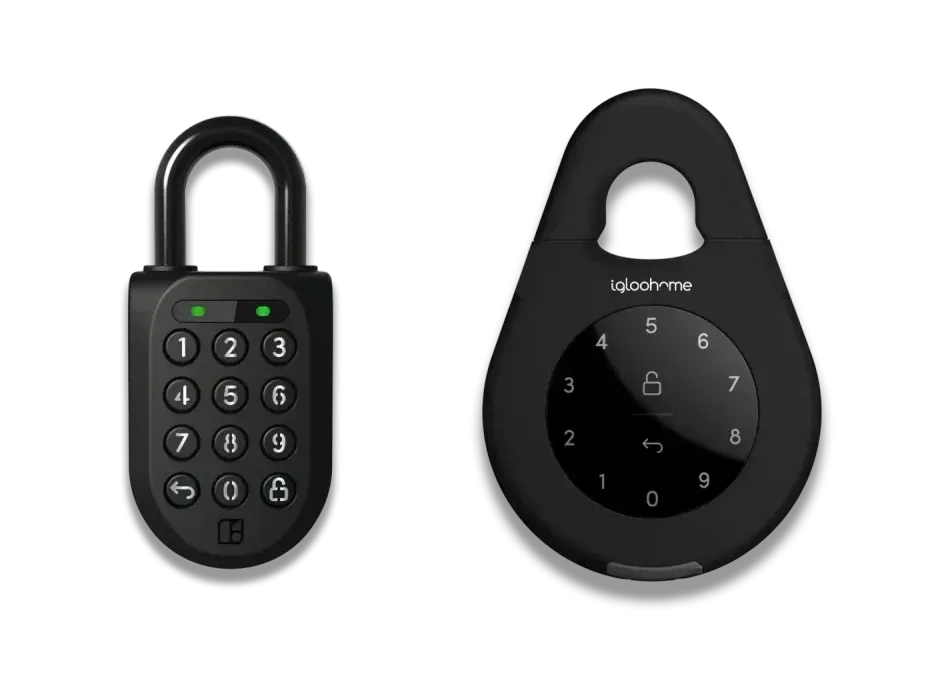
Digital locks
To unlock a digital lock, the customer does the following:
-
The customer opens their unlock page with the button in the confirmation email. The code shows 15 minutes before the booking starts.
-
Press any button to activate the lock.
-
Key in the code.
-
Tap the lock symbol in the lower right corner.
-
The lock opens.
Manual locks
The customer finds the code on the same unlock page and opens the lock with it.
Difference between digital and manual locks
With a digital lock, every customer gets their own code. A manual lock keeps the same code until you change it.
Before the code: you can ask customers to accept your terms, answer your questions, upload a photo or watch a safety video before they see their code.
3. Use the product
Now the customer is ready to paddle a canoe, enjoy a quiet moment in a sauna or take a trip with a boat out at sea! Before the booking ends, an automatic email reminds the customer to bring it back – new accounts start with one 30 minutes before the end, and you can write your own.
If the customer runs into a problem with the gear, you can solve most issues from your account.
4. Return
When the rental is over, the customer brings the gear back, locks it with the same code and confirms the return on their unlock page, so you see when – and whether – it came back.
Questions at the return: you can automatically ask customers questions when they return – a rating, a free-text question or a review – and ask for a photo. When your location is on Google Maps, the unlock page then shows your Google rating and a button to review you.
Summary
In conclusion, Rentalbuddy’s digital booking system makes renting different types of equipment smooth and simple, whether the rental is unmanned or staffed. Through four simple steps – book, unlock, use and return – a customer can quickly and securely get what they want to rent. With several payment options and secure payments through Stripe, as well as easy unlocking, Rentalbuddy makes your customer’s rental both comfortable and safe. With Rentalbuddy, it is easy for the customer to rent, and for you to rent out.
Are you interested in starting your own business where you can use our system? Read our guide on how to start and run your rental business with Rentalbuddy’s booking system.