4 min read By Rentalbuddy
A guide for how to start and run your rental business with the Rentalbuddy booking system
Updated:
At a glance
To start a self-service rental with Rentalbuddy, you sign up for a 30-day free trial (no credit card), add your location and what you rent, connect your own Stripe account, pair Igloohome padlocks or key boxes, make a test booking and share your booking page, link or button. Setup typically takes a few hours to a couple of days; Rentalbuddy then costs from 299 SEK a month excl. VAT, with no commission.
A good prerequisite for running an unmanned rental business is that you as the owner have a booking system that makes it easier for both you as a business owner and for your customers. Regardless of whether you want to rent out kayaks, canoes, boats, trailers, bicycles, SUPs or skis, Rentalbuddy helps you rent out smoothly, safely and easily. In this blog post, we explain how it works to start and run an unmanned rental with Rentalbuddy’s booking system, and how we help you along the way.
Ready to start? How to start a self-service rental takes you from agreeing the spot to your first booking in six steps, with every cost.
Self-service, staffed or both: Rentalbuddy’s booking system works for unmanned and staffed rentals, and for a mix of the two.
The booking system in three parts
-
The admin tool – the central hub where you manage your rental business. From here, you set up and change your products, adjust prices, view bookings and follow your sales.
-
Book button – the booking window your customers use, on your website or your booking page. The checkout is short and quick, guiding the customer through choosing products and rental dates and paying.
-
Lock – the part that makes unmanned rental work. The system works with Igloohome’s digital locks. Once a booking is made, the customer gets their own code on their unlock page and opens the lock without a physical key.
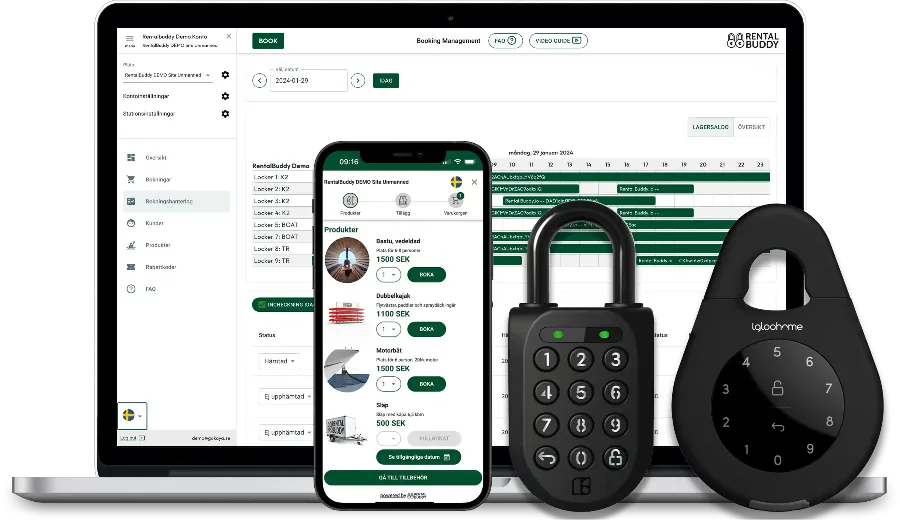 Rentalbuddy’s Admin tool, Check-out, and Igloo lock.
1. Create an account
Sign up with your email at app.rentalbuddy.io. You get a 30-day free trial with no credit card – or set your launch date and it runs until then, up to 180 days. The Guide on Home then takes you through setup in order: your location and open dates, what you rent, locks and access, getting paid (Stripe, your terms and a tax rate), a test booking and choosing a plan.
Each product can have accessories, insurance and high- and low-season prices, and self-service lets you keep longer opening hours than a staffed counter.
With an account at Rentalbuddy, you don’t have to worry about your business growing. Starter covers one location and up to 6 locks, and Growth adds more locations and locks as you grow. See pricing
Events and partners: you can also add events, such as guided tours or courses, and let other businesses create offers around your rental in the booking system.
2. Buy and pair your digital locks
You buy Igloohome padlocks or key boxes once, from Igloohome or a reseller, and pair them in the Igloohome app. Add a card in Igloo Connect – Igloohome’s code service, about 20 SEK per lock a month, billed by Igloohome – then connect Igloohome in the Rentalbuddy admin and sync the locks. Rentalbuddy then creates a new code for every booking.
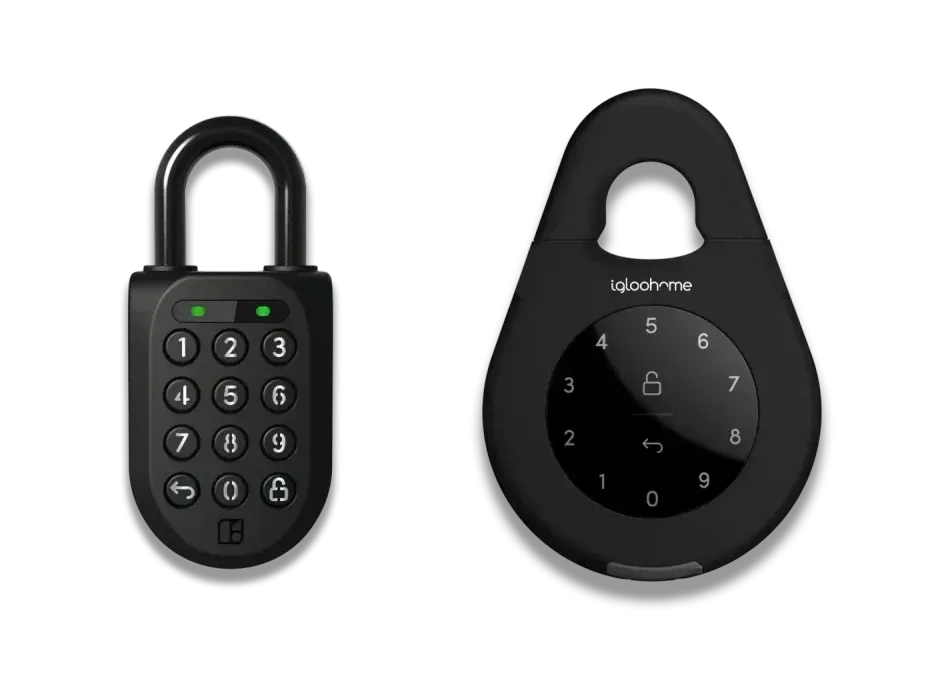 The Igloohome Padlock 2 and Keybox 3: Rentalbuddy makes a new code for them on every booking.
You can also use manual code locks. You simply enter the codes in the Admin tool. When a customer then books, the code shows on their unlock page, which the button in the confirmation email opens. That’s also how you can set everything up and make test bookings before you buy a single lock.
The advantage of digital locks: every booking gets its own code, while a manual lock keeps the same code until you change it.
3. Connect to the payment system and take payments
Rentalbuddy’s booking system is integrated with Stripe for secure payment. With Stripe, whoever rents from you can choose how they want to pay. There is support for:
-
Card
-
Swish
-
Klarna
-
Link
-
Apple Pay
-
Google Pay
-
As well as some other country-specific solutions
Card, Apple Pay and Google Pay work right in the booking window; for Swish, Klarna and other local methods the customer pays on Stripe’s payment page.
Account with Stripe
To use Stripe, you need a Stripe account for your business – free to open, also as a sole trader – which you open or connect from the setup guide in the admin. How and when you get paid
Rentalbuddy never holds your money: customers pay into your own Stripe account, and Rentalbuddy takes no commission.
4. Choose how customers book
Every location can take bookings three ways: a booking page Rentalbuddy hosts for you (no website needed), a booking link for your menu, Instagram bio or Google Business Profile, or a button on your own website. For the button you paste two short pieces of code – the booking engine once, site-wide, and the button where it should show – and the admin shows when it’s live. Someone else runs your website? Send them the install link from the same tab. Each location also has a QR code to print.
The booking button works on most website builders, such as Wix and WordPress. You can change your products, descriptions and prices at any time in the admin.
Make a test booking yourself at our example rental to see what your customers see.
Want to learn more about how to make your website better? Read our guide where we explain how you can increase your bookings with an optimized website.
5. Ready to start
Book once yourself first: every location has a Make a test booking button – a free test, or one with a real payment that is refunded right away. Then you are ready to open your unmanned or staffed rental.
6. Support
Via your account, you get access to many smart functions so that you can provide support to your customers remotely:
-
If your customer calls and has a problem with the product they booked, you can easily move the customer’s booking to another available product.
-
If your customer calls and wants to extend their booking, you help them via your account.
-
If your customer calls and says: “Now I’ve rented a lot from you!”, you can easily create unique discount codes or ‘season tickets’ – a pleasant problem to have!
-
If you need to repair a product, you can deactivate it during the repair.
-
If you are away and want to ‘pause’ your rental, you can easily block pick-up and return dates.
Every page in the admin has a help button with the guides for that page, and all guides are in the Help Center. Or call +46 10 516 46 26 or email info@rentalbuddy.io, 8:00–17:00 CET/CEST.
Read more about us and the people behind Rentalbuddy
Summary
With Rentalbuddy’s rental booking system, it is easy and convenient for you to either start a rental business, or expand your existing rental business. We’re here if you need help, and we support you throughout the process.